VolleyLuma

Free for Windows and Android

Volleyball scouting and analysis in one app

Scout the match with codes, open any rally on video, build a montage and prepare for the opponent. Your own AI runs on your computer, and a tablet at the bench shows rallies with video right during the game.

Windows 10 / 11 · 64-bit

  • .dvw format
  • AI on your PC
  • 10 languages
  • No sign-up

Ecosystem

Laptop, team site and tablets — one system

VolleyLuma works great on its own. Together with the volleyteam.link site and tablets at the bench it becomes a shared workspace for the whole staff.

VolleyLuma for Windows

The scout’s laptop: scouting, video, analysis, montage, AI

volleyteam.link

Team site: matches, statistics, video, practices

Tablets and phones

VolleyLuma for Android or a browser

Gym Wi‑Fi“Bench”: score, analyses and rallies with video — no internet needed

What a match day looks like

  1. 1

    The scout records the match in VolleyLuma on a laptop — with a camera, a video file or a link.

  2. 2

    The coach opens “Bench” on a tablet: score, analyses and a replay of any rally.

  3. 3

    After the game — “Send to volleyteam.link”: the match and statistics appear on the team site.

Features

Everything a scout and a coach need — in one app

From the first serve to the team video session — without switching between programs.

Scouting

Coded scouting — fast and without stops

One scoreboard, the way you are used to: score on top, rosters on both sides of the court, the code line at hand. Type codes with your own keys — the app keeps the score, rotations and substitutions.

  • A mistake in a code never stops scouting: the line gets a ⚠ and you fix it later
  • “Video”, “Balance” and “Free” layouts — arrange the panels the way you like
  • ⚑ marks a rally you had no time to record; 💬 adds a note to any line
  • Standard .dvw scouting format: a file without edits is saved byte for byte
Video and camera

Video behind every code line

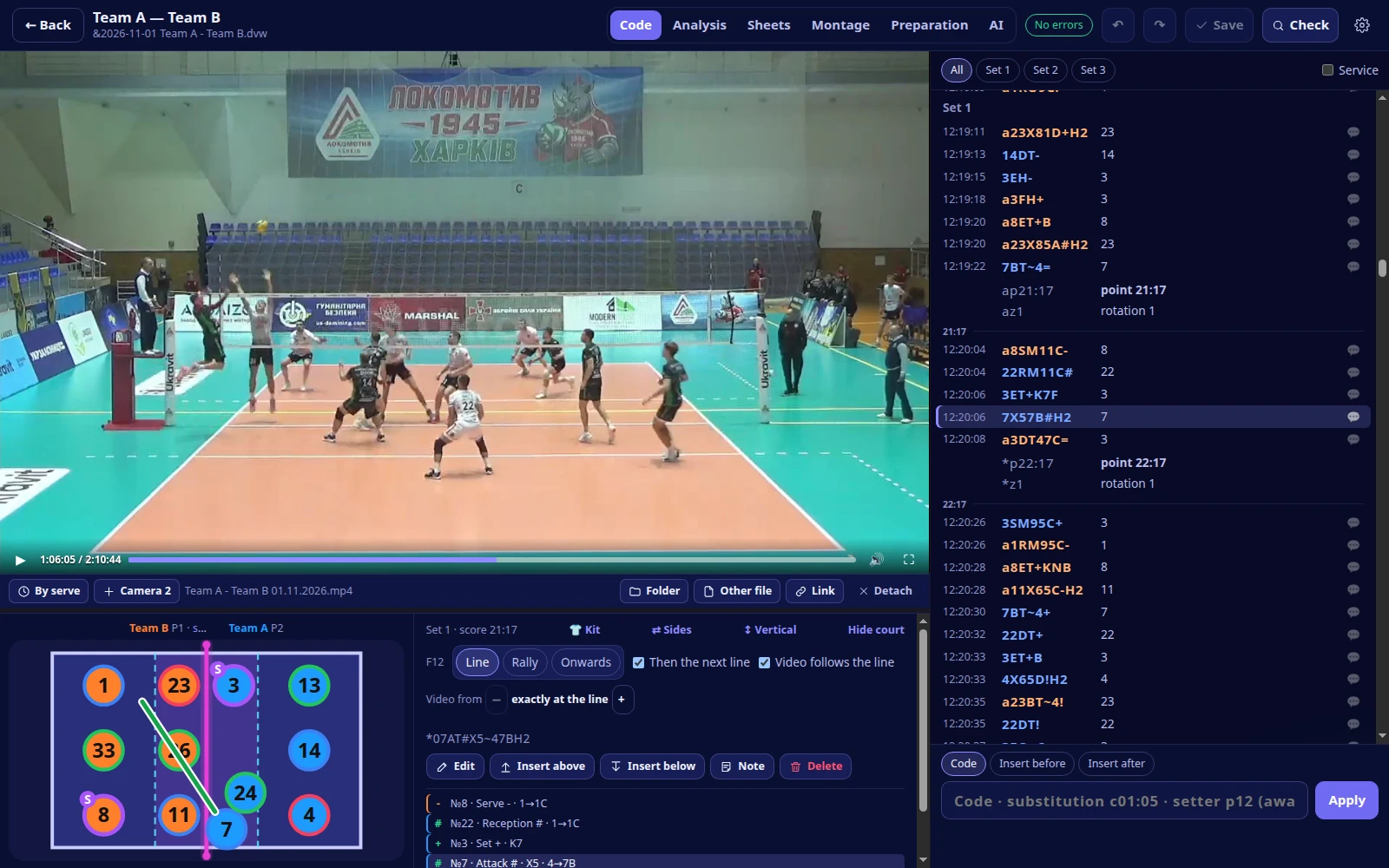
Attach a file, a YouTube link or a camera — and any rally opens at the right second. F12 gives a line the exact frame, “By serve” syncs a whole set at once.

  • Camera: a capture card or an IP camera on the network — record to a file, stream to YouTube and to tablets
  • A second camera of the same match syncs itself — by sound and motion
  • Smart touch time: the app tracks the ball on video and refines the seconds
  • Its own player for files and YouTube: click to pause, speed up, full screen
The “Code” window: match video stopped on the selected code row, court with the attack direction

Analysis

Analysis that takes you straight to video

Players, skills, points, rotations, zones, combinations, calls, Setter distribution and INDEX — for one match or several at once. Click any number to see those actions on video.

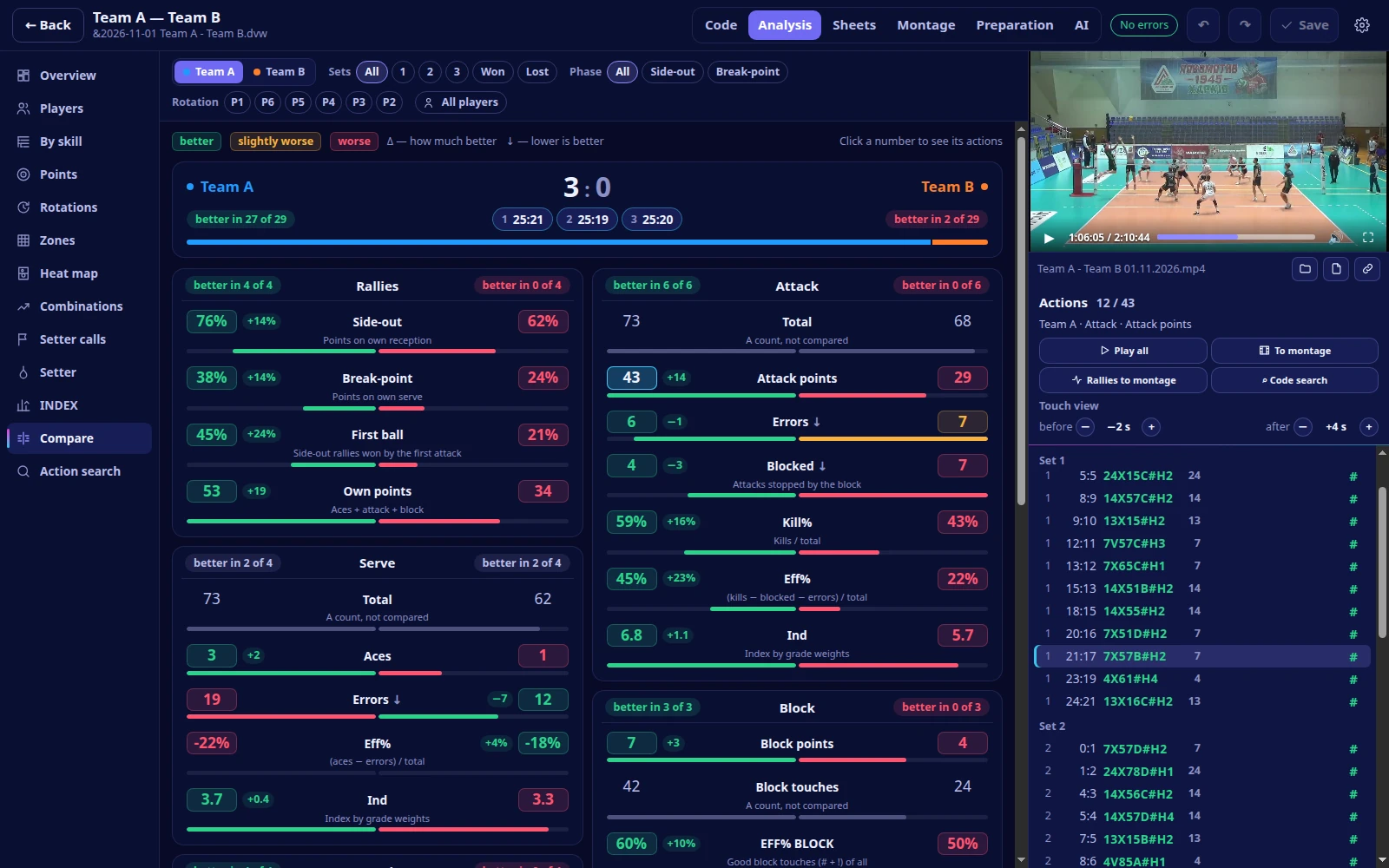
  • “Compare”: both teams side by side, with the better one highlighted in every metric
  • “Heat map”: where they attack and serve — heat, arrows, zones
  • “Setter”: share of sets by zone and attack result — by rotation and reception quality
  • Excel export and a clear colour legend
Match analysis: comparison of the two teams, the better figure highlighted, the attack points listed next to the video

Montage

Montage straight from the code

Find moments with the code search — say, every attack of a player from zone 4 after a perfect reception — tick the ones you need and build the video. Captions, drawings and pauses go right into the video.

  • Code search: team, player, skill, grade, zones and rally conditions
  • Arrows, lines, circles, player highlight, text and freeze frames on the video
  • Captions: name, skill, code in the grade colour, set and score
  • Export to a file or to folders on volleyteam.link

AI scouts a match

Your own AI scouts the match from video — on your PC

Set the teams, rosters and video — a file or a YouTube link. The AI watches the video on this computer’s graphics card and writes codes straight into the match: rallies appear as it goes, and you can correct right behind it.

  • Serve type, attack tempo, combination, set target and grades — the way a scout writes them
  • The scoresheet as a file (scoresheet or match report PDF, .dvw) — for cross-checking
  • With a YouTube link it starts right away: the video streams, no download first
  • Everything is computed on this computer; without a graphics card — on the processor, just slower

AI preparation

Opponent preparation — clips and slides for every player

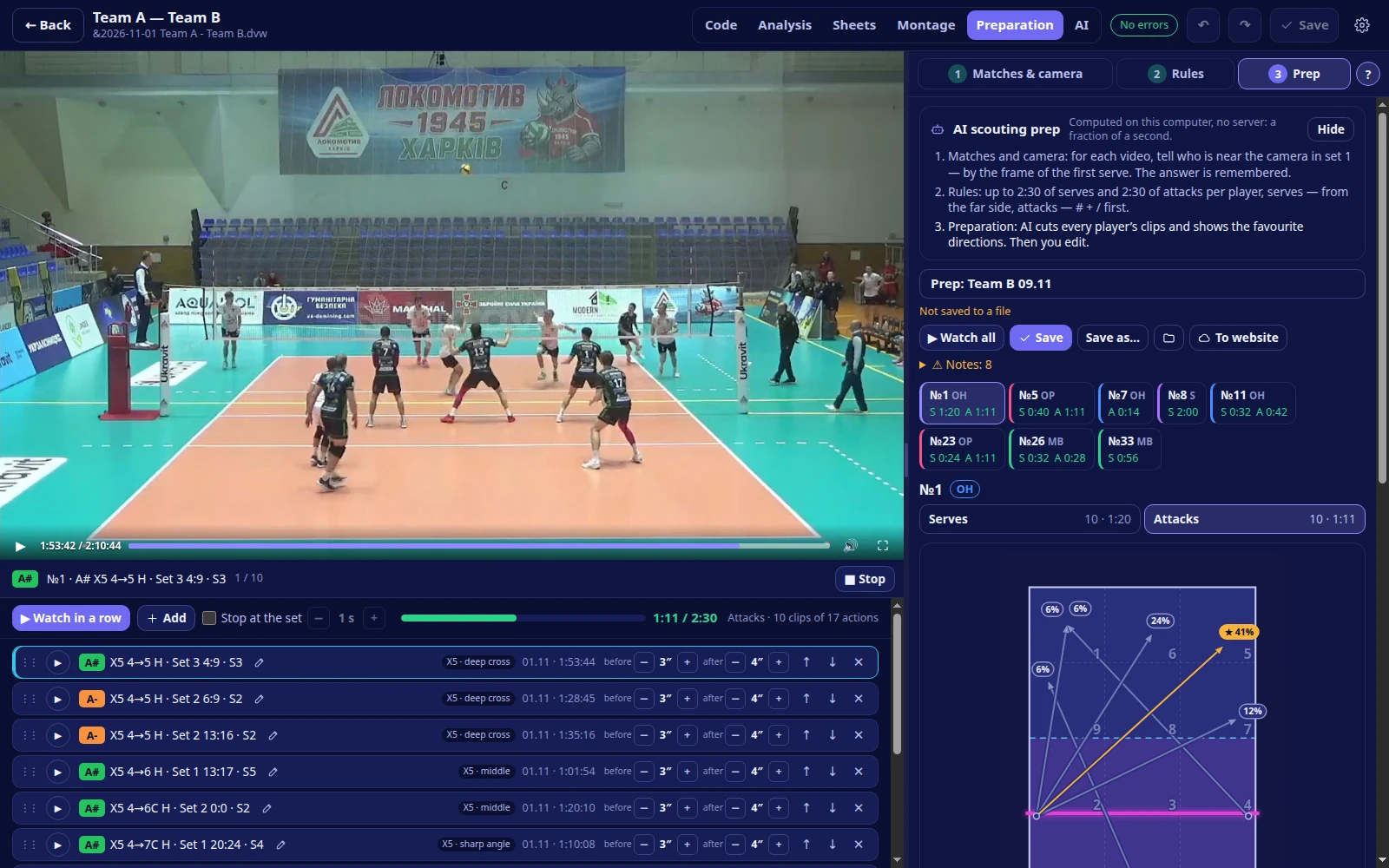
Pick the opponent’s matches — the app cuts every player’s serves and attacks (up to 2:30 per player) and builds “Breakdown” slides with their favourite directions.

  • Directions in plain words: line, middle, long and short diagonal, tip
  • The staff edits the AI text: remove a phrase, restore it, add your own note
  • “To website” — as a playlist on volleyteam.link: players watch the result on their phones
  • Computed on this PC; opponent matches come from the season or from volleyteam.link
AI preparation: an opposing hitter’s attacks — directions on the court, favourite shot and the clips under the video

Bench

A tablet at the bench — rallies with video during the match

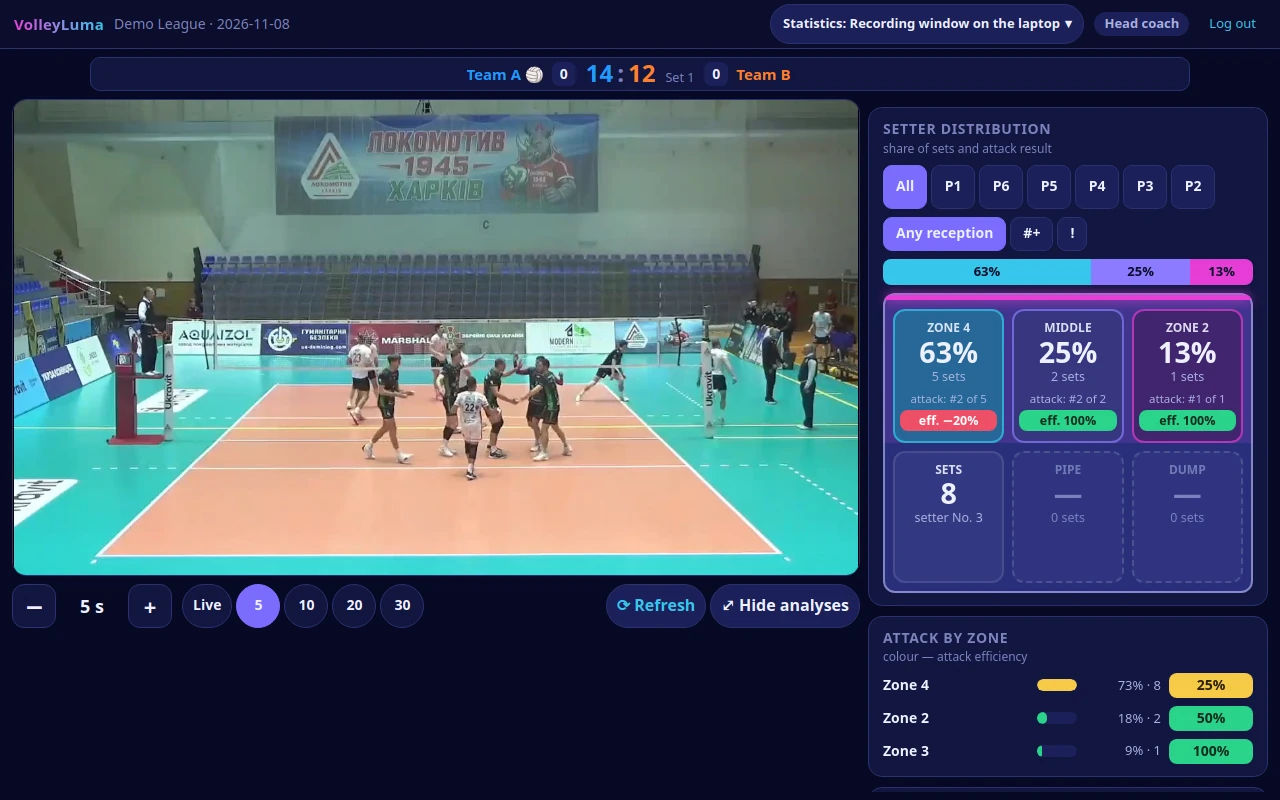
VolleyLuma shares the match over the gym Wi‑Fi. The coach’s tablet shows the score, colour-coded analyses, the latest rallies with replay and a delayed stream — no internet needed.

  • Rally replay from serve to point; ★ keeps the one you need for good
  • PIN profiles: coach, assistant, statistician, media — each with its own set of analyses
  • Setter distribution, the “Players” table and your own analyses
  • Stream delay of your choice, or “Live”
“Bench” on a tablet: score, analyses and rallies with video

And more

  • Line-UP

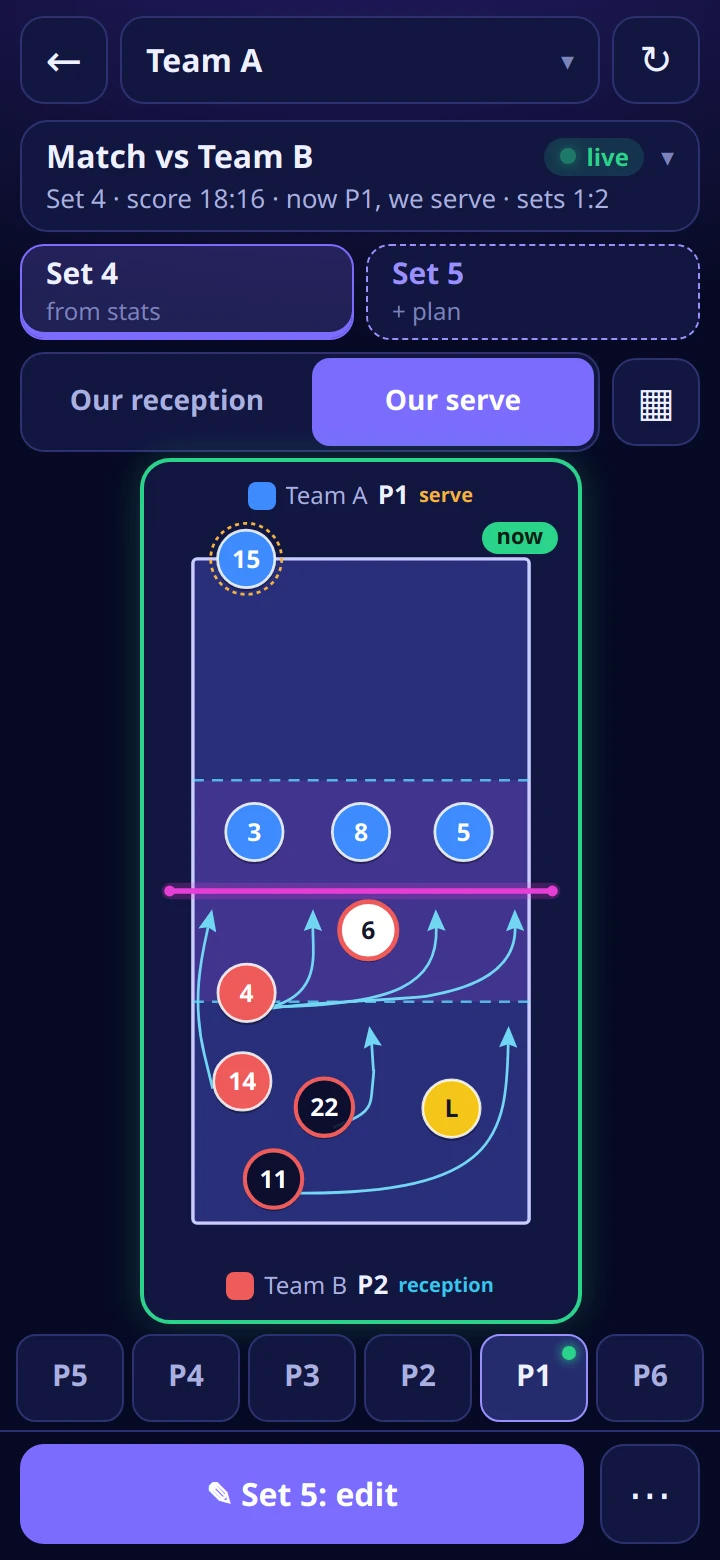
    Line-ups for all six rotations with movement arrows; the starting six comes from the team’s matches in the season.

  • Sheets

    Your own report tables, like in Excel: ranges, fill, copy and paste, sorting, “Rally by rally”.

  • Teams

    Rosters and logos from federation sites, volleyteam.link or a .dvw file; duplicates of one team are merged.

  • Own combinations

    Code, tempo, where the hit starts and the set target — Setter distribution and analyses count them right away.

  • Settings transfer

    Keys, defaults, compound codes, combination and call tables — from the scouting program you used before.

  • .dvw archive

    A folder with your past matches connects read-only — its seasons show up in the app right away.

  • Scouting check

    Volleyball rules: a missing attack, extra touches, a point to the wrong team — with a jump to the line.

  • YouTube streaming

    With your Google account: the stream is created on your channel and added to a playlist; a dropped connection reconnects without stopping the recording.

  • Appearance

    Six themes, your own accent colour and a gradient background.

  • Self-updating

    A new version is downloaded and verified in the background and installs on top — your data stays.

VolleyLuma for Android

The staff’s tablet and phone

The app is made first of all for the tablet at the bench. Three modes are on the start screen, and the app remembers the last one.

  1. Bench

    Finds the laptop with VolleyLuma on the gym network: score, analyses, rallies with replay and a delayed stream. After a Wi‑Fi drop the connection comes back by itself.

  2. Line-UP

    The line-up for a set across six rotations. It pulls the team’s active match from the site — set, score, starting six, setter, libero and serve. The plan for the next set is saved to the site.

  3. volleyteam.link

    The team site as an app — with file downloads.

Download for Android

Android 7 or newer · updates itself

Scan with the tablet camera to download

Line-UP in the Android app: rotations with movement arrows
The volleyteam.link team site on a phone

volleyteam.link

A team site that works together with VolleyLuma

Practices, load, health, matches, statistics and video — in one place for the staff and the players. On a phone the site installs on the home screen and works like an app.

Together with VolleyLuma

  • Sync: matches and Scouting recordings from the site go to VolleyLuma, your matches go to the site
  • Match publishing: before sending you see what is on the site now and what you are sending
  • Live statistics: the staff scouts on the site from a tablet or iPad — and it shows up on the “Bench”
  • Video from the laptop: while a practice is recorded on an iPad, the laptop camera video goes straight over the gym network
  • AI preparation — as a playlist for the players

The sign-in screen has a demo login — look around without registering.

Want to connect your team? Write to us. [email protected]

What it looks like

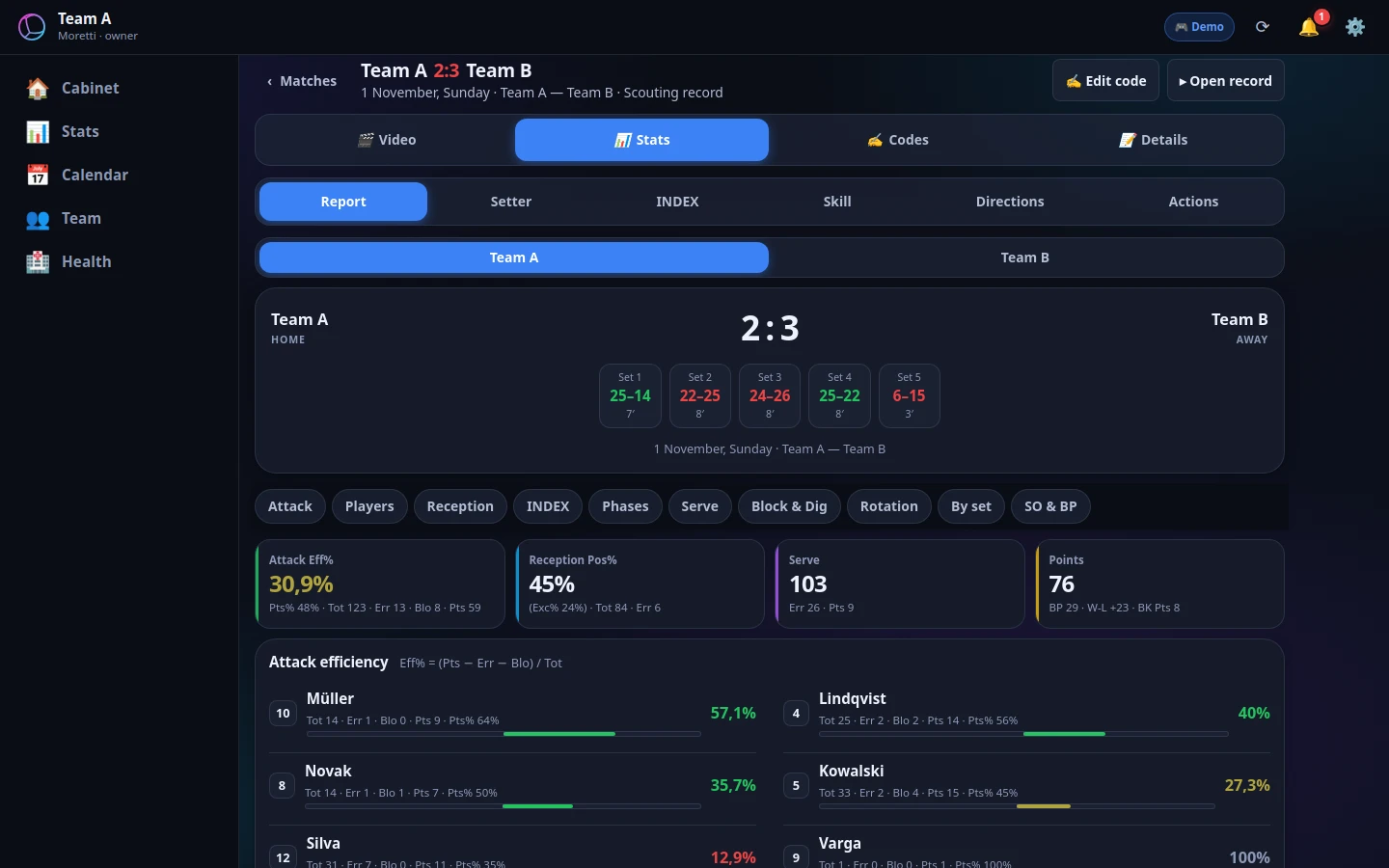
volleyteam.link — Match and statistics: Set scores, team and player figures
Match and statisticsSet scores, team and player figures
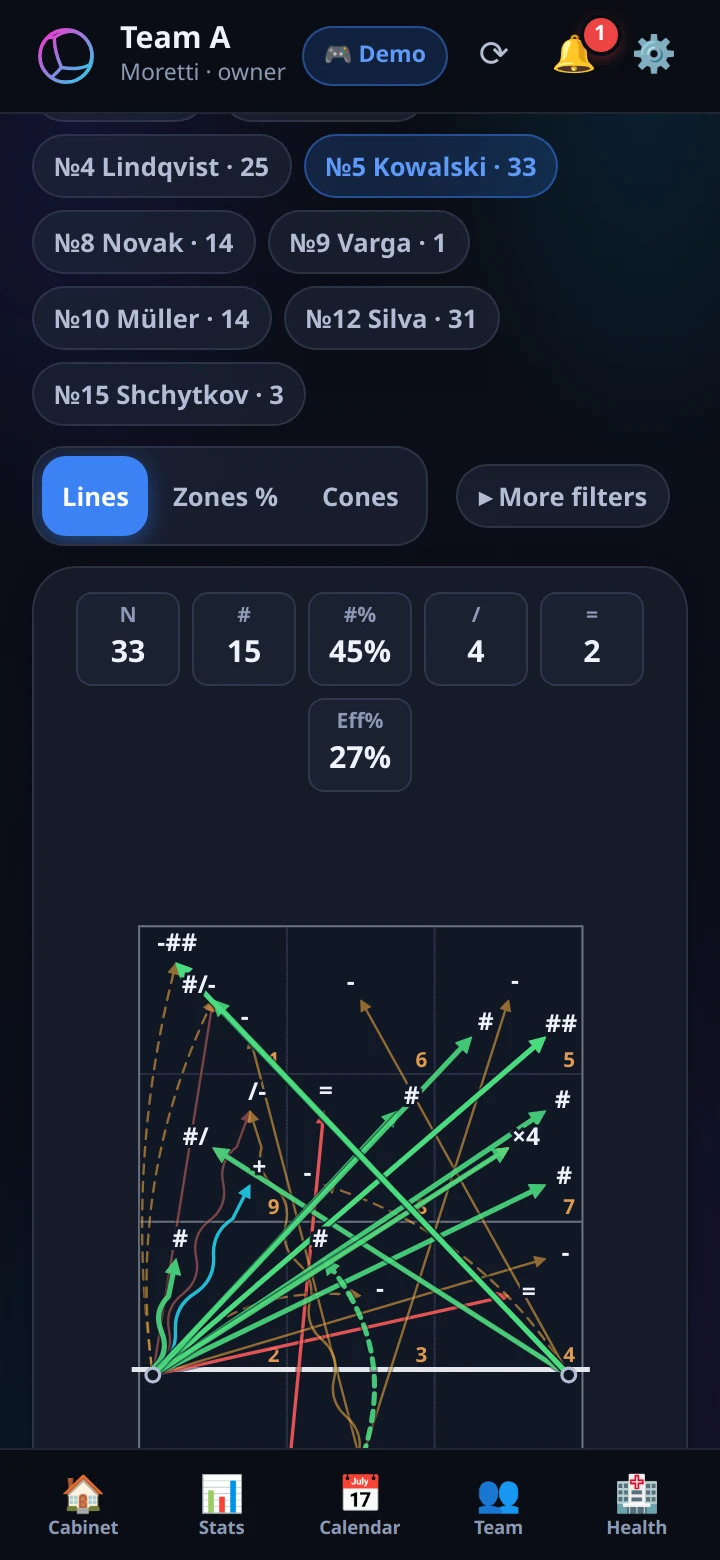
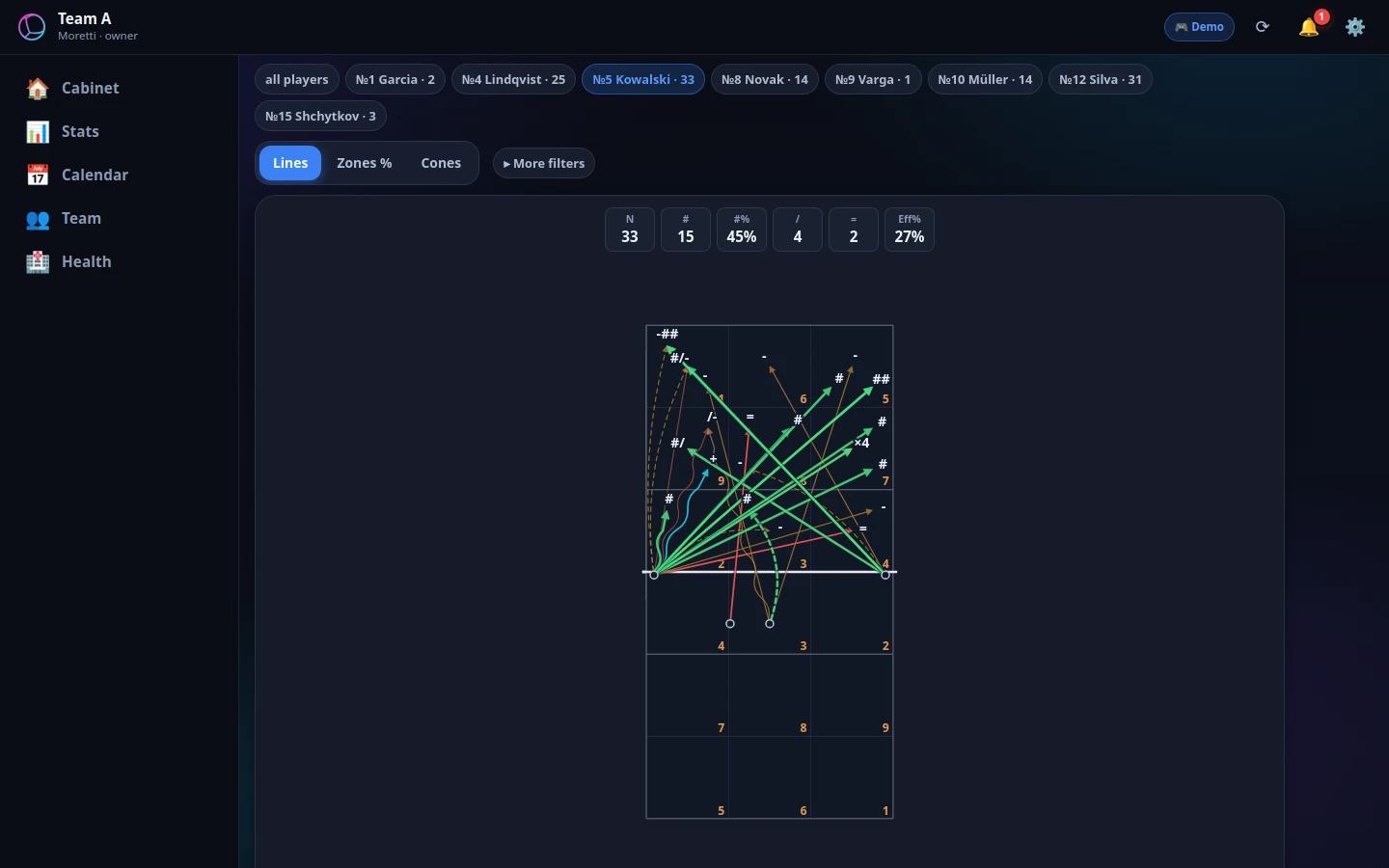
volleyteam.link — Attack directions: Arrows and zones for every player — filter by skill and grade
Attack directionsArrows and zones for every player — filter by skill and grade
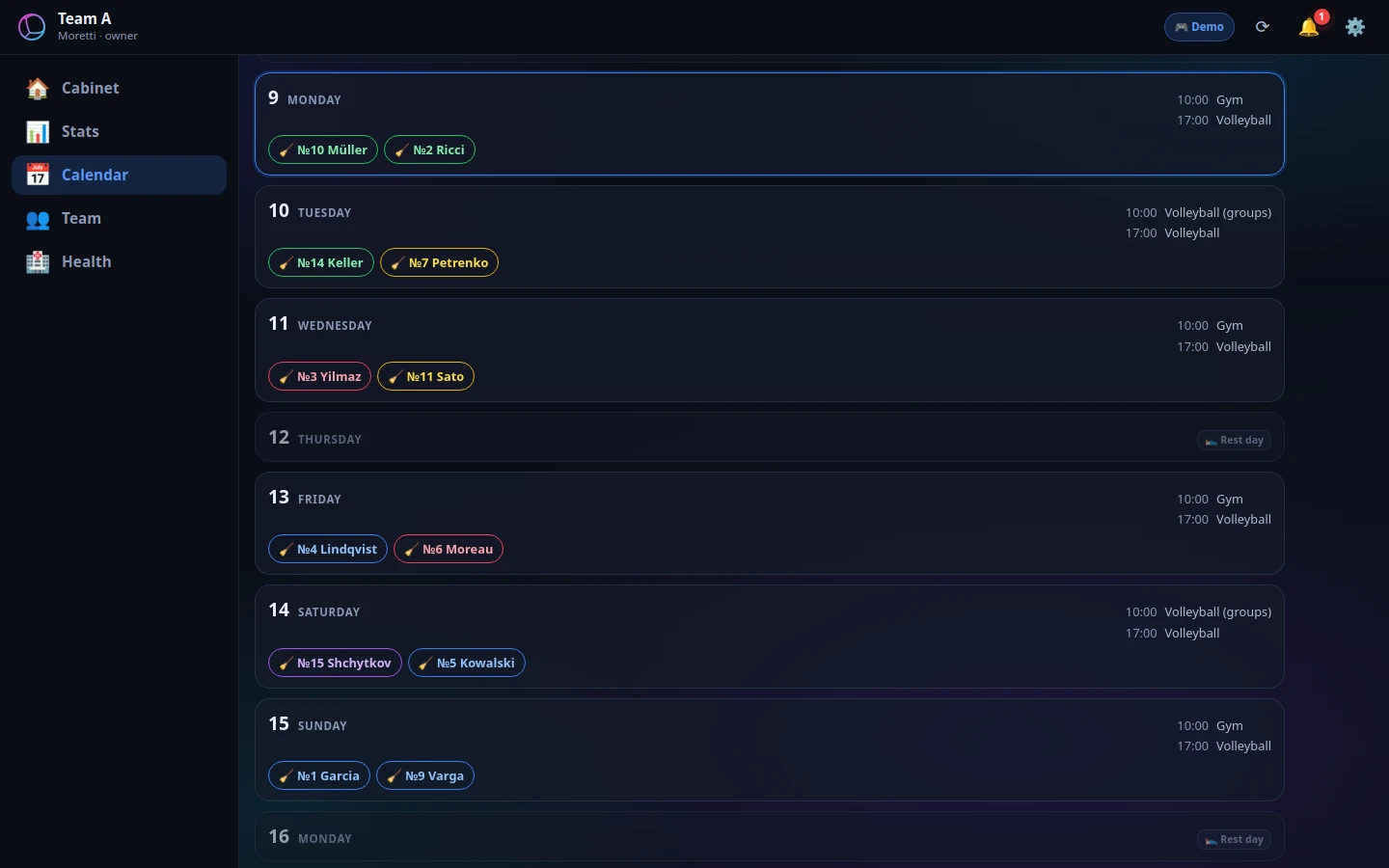
volleyteam.link — Calendar: The week’s practices and players on duty at a glance
CalendarThe week’s practices and players on duty at a glance
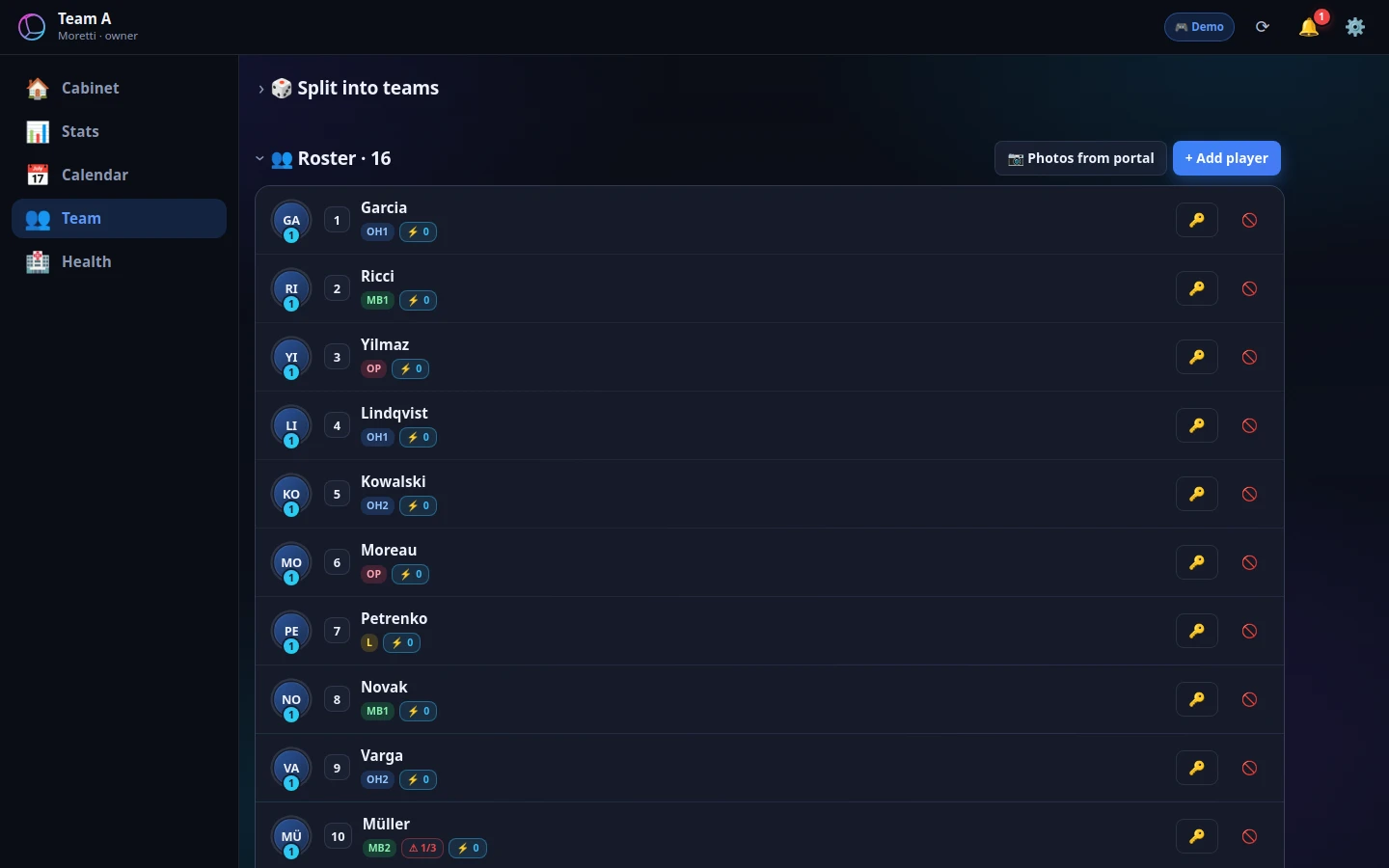
volleyteam.link — Team: Roster, positions and numbers — shared by staff and players
TeamRoster, positions and numbers — shared by staff and players

10 languages

In your language

The app, the installer and this site speak ten languages. You pick the language during installation and can change it any time: Settings → General → Language.

Requirements

What you need

VolleyLuma for Windows

  • Windows 10 or 11, 64-bit
  • About 700 MB of disk space for the app, plus room for video
  • A graphics card is optional — the AI is faster with one
  • Internet only for updates, YouTube and volleyteam.link
  • To record from a camera — a capture card or an IP camera on the network (optional)

VolleyLuma for Android

  • Android 7 or newer, a tablet works best
  • For “Bench” — the same Wi‑Fi as the laptop, or its hotspot
  • For match data in Line-UP — sign-in to volleyteam.link

Pricing

Free — or PRO for the whole team

The app is free. PRO is for staff who need more devices and a team site on volleyteam.link.

Billing

FREE

$0forever 
  • Scouting, analysis, video and montage
  • Up to 2 devices
  • Android app and the “Bench” on a tablet
  • Updates
Download for free

For teams

PRO

$39per month 
$219per 6 months≈ $36.5 per month · save $15
$400per year≈ $33.3 per month · save $68
  • Everything in FREE
  • Up to 3 devices
  • volleyteam.link team subscription included
  • Priority help by e-mail
Buy PRO

volleyteam.link on its own

The team site for staff and players — without PRO.

$19per month 
$109per 6 months≈ $18.2 per month · save $5
$200per year≈ $16.7 per month · save $28
  • Matches, statistics and video
  • Practices and calendar
  • Works like an app on phones
Connect your team

For now, purchases are by e-mail: write to [email protected] and we will reply with an invoice. Prices in US dollars.

FAQ

Frequently asked questions

Is VolleyLuma really free?

Yes. Download it and use it — no sign-up, no trial period, no ads.

Can I open my .dvw files?

Yes. VolleyLuma reads and writes the standard .dvw scouting format. A file without edits is saved byte for byte, and an archive of past matches can be connected read-only.

I used a different scouting program. Do I have to set everything up again?

No. Settings → Scouting → “Transfer from the scouting program…” brings over keys, defaults, compound codes, substitutions, combination and call tables. You see exactly what will be taken before it is applied.

Do I need the internet?

Not for scouting, analysis, montage, AI or “Bench”. The internet is needed for updates, YouTube streaming, syncing with volleyteam.link and loading rosters from federation sites.

Where does the AI run?

On your computer: on the graphics card if there is one, otherwise on the processor. Video from your disk is not sent anywhere for this.

Is there a Mac or Linux version?

Not yet: VolleyLuma for computers runs on Windows 10 and 11 (64-bit). For tablets and phones there is the Android app, and “Bench” also opens in the Chrome browser.

Windows says “Windows protected your PC”. What should I do?

Click “More info” → “Run anyway”. This is how Windows warns about new programs; after that VolleyLuma updates itself.

How do updates arrive?

The app checks for a new version, downloads it in the background, verifies the checksum and offers “Update now” or on exit. The update installs on top, your matches and settings stay.

Do I have to use volleyteam.link?

No, VolleyLuma works without it. The site is for teams that want shared matches and statistics, live data on the tablet and playlists for players.

Where are my matches stored?

On your computer, in the season folder. Only what you sync or send yourself goes to volleyteam.link.

Download

Get VolleyLuma for free

No sign-up and no trial period. The app updates itself.

VolleyLuma for Windows

Windows 10 / 11 · 64-bit

Latest version

Download for Windows
How to install
  1. Download and run VolleyLuma-Setup-….exe.
  2. If Windows says “Windows protected your PC” — “More info” → “Run anyway”.
  3. After that the app updates itself; updates install on top and your data stays.

VolleyLuma for Android

Android 7 or newer · tablet and phone

Latest version

Download for Android
How to install
  1. Tap “Download” and open the ….apk file.
  2. If the tablet asks — allow installing from this source.
  3. After that the app updates itself: it offers “Update” when a new version is out.

All apps and backup links — volleyteam.link/downloads